Building Your
Personal AI Assistant
How a non-developer runs a marketing agency with Claude Code
What actually is an agent?
It's not magic. It's a folder.
An agent is a folder on your computer. Inside it, a CLAUDE.md file tells Claude who it is, what it does, and what rules to follow. Other files give it the context it needs. When you open Claude Code in that folder, it reads everything and becomes that agent.
CLAUDE.md
The instructions. Tells Claude who it is, what it does, and what rules to follow.
Context files
The knowledge. Client data, templates, transcripts, reference docs. Whatever the agent needs to do its job.
Claude Code session
The activation. Open Claude Code in the folder. It reads everything and becomes that agent.
That's it. Every agent you saw on the previous page is just a folder with a CLAUDE.md and some files. The architecture comes from how you organize those folders and what instructions you put in each one.
But first: do you have something to use it for?
Everything below becomes incredibly useful once you're already working in Claude Code and have a few projects you want to get off the ground. If you're not there yet, we built a tool that generates custom project ideas based on your business.
Try the Recipe Generator↗The CLAUDE.md Hierarchy
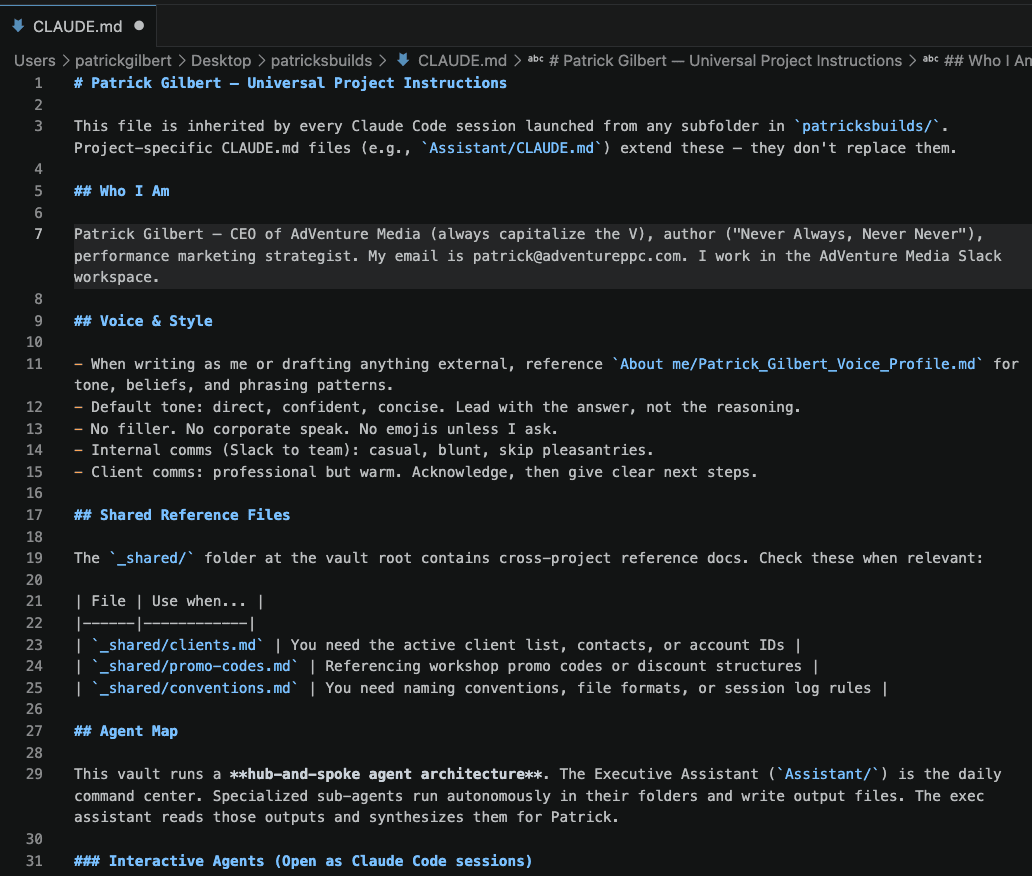
One root config. Every project inherits it. Each agent extends it with domain-specific instructions.
- ●Identity & voice rules
- ●Universal rules: never send without confirmation, never fabricate
- ●Plugin profiles: web-app / coding / ceo-hub
- ●Agent map: hub-and-spoke architecture
- ●Accounts & integrations
- ●Session title protocol
Key insight: Write it once. Every session inherits it. New agents get your voice, rules, and preferences automatically.
Here's what mine actually looks like
Hub-and-Spoke Architecture
The Assistant reads from everywhere. Each agent owns its domain. Hover to explore.
PPC Client Work
PPC Strategist
LinkedIn Content
Content Director
AMGfin
CFO
Roger
Business Development
Iggy
Front-End Builder
PSEO
SEO Content Factory
NANN
Book Project
About me
Voice Profile (291 lines)
Spoke-to-spoke flow: Roger (research) feeds directly into Iggy (site builds). The Assistant orchestrates but doesn't bottleneck.
Why this structure?
Without it, your AI knows everything about nothing. With hub-and-spoke, each agent knows everything about its one thing.
The problem with one big folder
What hub-and-spoke gives you
Focus
Each agent only sees the files and instructions relevant to its job. Better context = better output.
Consistency
Your rules, voice, and preferences are written once in the root config. Every agent inherits them automatically.
Scale
New project? New folder, new CLAUDE.md. It inherits the root config instantly. No rewiring required.
One front door
The Assistant hub can reach into any agent's folder. You start your day in one place and it connects everything.
Bottom line: Claude does better work when it knows exactly what it's supposed to be doing. Hub-and-spoke gives every session a clear identity, focused context, and consistent rules.
Knowledge System
Your AI gets smarter over time, but only if you build the feedback loop.
Frameworks (6)
Reusable mental models for recurring situations
Patterns (6)
Observed behaviors codified from experience
Playbooks (2)
Step-by-step protocols for specific workflows
Decisions (3)
Past decisions with reasoning preserved
Voice Profile
291 lines from structured interviews. Captures tone, beliefs, phrasing patterns, and preferences. Referenced by every content-producing agent. You don't prompt for voice. You document it once and every agent inherits it.
The Learning Loop
Weekly Review generates answers. Answers become knowledge entries. Knowledge entries inform future sessions. The cycle repeats.
Automated Workflows
It runs while you sleep. You reply from your phone.
Meeting Ingest
Every 2 hoursPulls Gemini notes from Gmail, converts to markdown, routes to client folders
Command Listener
Every 15 minReads Patrick's Slack replies in #pg-agents, routes commands to the right agent
Morning Brief
Daily 8:00 AMCalendar + unprocessed transcripts + open items synthesized into #pg-agents
Intelligence Scan
Weekly Monday 7:30 AMScans email and Slack for new entities, emerging patterns, and opportunities
pg-agents
Central communication busAll agents post here. Patrick replies from his phone. Commands get routed to the right agent automatically.
process [client]Run transcript optimizationprep [client]Get meeting prepstatus [client]Quick status pulldraft [topic]Queue a LinkedIn postyes / noApprove or dismiss queued actionsReply from anywhere. The agents process your commands. No laptop required.
The Friday One-on-One
15 minutes on Friday. The AI gathers context. You just answer.
Your AI agents are employees. They need the same thing every good employee needs: regular feedback from their manager. If you hired someone and never gave them a one-on-one, never told them what they did well or what to improve, they'd plateau. Your agents are no different. The weekly review is how you invest 15 minutes so the system gets measurably better every week. The managers who care enough to show up for their people are the ones with the best teams. That applies here too.
You are my weekly review facilitator. Every Friday, you walk me through a structured reflection on the past week. Here's how this works:

BEFORE ASKING ANYTHING:
- Check my calendar for what happened this week
- Look for any recent meeting notes, transcripts, or action items
- Review any open threads or unfinished work
- Use this context to ask informed follow-up questions (don't make me recap things you can look up)

THE 7 QUESTIONS (ask one at a time, wait for my response before moving on):

1. What was the single most important thing that happened this week?
2. Which project or client got better this week? Which got worse?
3. What decision did I make that I want to remember in 6 months?
4. What did I learn this week?
5. What's still nagging me that I haven't dealt with?
6. Where did I spend time I shouldn't have?
7. What are the 3 things that actually matter next week?

RULES:
- Keep it conversational. This isn't a form — it's a thinking exercise.
- Short answers are fine. Don't push for essays.
- If I say something interesting, ask one follow-up before moving on.
- Don't summarize after every answer. Just move to the next question.

AFTER ALL 7 QUESTIONS:
1. Write a structured weekly review document with: key decisions, learnings, priorities for next week, and any unresolved items.
2. If you noticed a recurring pattern or a decision worth preserving, offer to save it: "I noticed [observation]. Want me to save this as a pattern/framework in your knowledge folder?"
3. Save the review to a file named weekly-review-[YYYY-MM-DD].md

Begin by telling me what context you gathered, then ask question 1.
How it works
Auto-gathers context
Before asking anything, the AI pulls your calendar, open action items, recent transcripts, and Slack threads from the past week.
7 questions, conversational
Asked one at a time. Each builds on the last. Short answers are fine. The AI captures nuance.
Writes to Obsidian
Structured weekly review saved to Daily/Weekly/ with decisions, learnings, and next-week priorities.
Offers knowledge promotion
"I noticed a pattern in how you handled the pricing discussion. Want me to save this as a framework?" Your choice.
What was the single most important thing that happened this week?
Which client got better this week? Which got worse?
What decision did I make that I want to remember in 6 months?
What did I learn this week?
What's still nagging me that I haven't dealt with?
Where did I spend time I shouldn't have?
What are the 3 things that actually matter next week?
Your Starting Point
You don't need 8 agents on day one. You need one prompt.
How this system was born
I watched a YouTube video about someone running their business with AI agents. I didn't understand the architecture. I didn't know what CLAUDE.md files were. I didn't have a plan.
I just copied the video transcript, pasted it into Claude Code, and said:
“Here's a transcription of a video. I want this setup. Organize all my files so I can manage a group of sub-agents through one single assistant agent. Build this for me.”
That's it. Claude created the folder structure, wrote the CLAUDE.md files, set up the hub-and-spoke architecture, and explained how to use it. Everything you've seen on this page grew from that one conversation.
You don't need to understand the architecture first. You just need to tell Claude what you want and let it build the scaffolding.
Build Your Agent Architecture
expandOpen a new Claude Code session in an empty folder. Paste this prompt. It creates your root CLAUDE.md, an Assistant hub, a knowledge system, and two starter sub-agents customized to your work.
Extract Your Voice Profile
expandOpen a new Claude Code session. Paste this prompt. It runs a 100-question interview that captures the DNA of how you think and write. The output is a voice profile every agent can reference.
Personalize Your CLAUDE.md
expandAfter the Taste Interview, Claude already knows you. Paste this prompt to have it customize your CLAUDE.md with your identity, preferences, and rules. It fills in the blanks so you don't have to.
Build your knowledge folder
Document your frameworks. Record decisions with reasoning. The AI compounds over time.
Add your first automation
A morning brief or meeting ingest. Something that runs without you. You'll never go back.
If you ever get stuck
You don't need to memorize any of this. If you hit a wall, just open Claude Code and paste something like:
I'm trying to build a personal AI agent using Claude Code. I am inspired by the structure presented on this webpage: patricksassistant.com

I want a hub-and-spoke agent architecture with a root CLAUDE.md, an Assistant hub, and specialized sub-agents for different areas of my work. What can I do to set up a personalized agent similar to this, but customized for my working style?
Context is the skill, not prompting.
The best prompt is the one you never have to write twice.
What's Next — Upgrade Context Retrieval with Pinecone
The system works today with keyword search. The next unlock is semantic memory.
The limitation right now
Right now, when the AI needs to recall something, it searches your files for matching keywords. That's like searching your email by typing an exact phrase and hoping it shows up. If the words don't match, it misses it.
The upgrade: semantic memory
A vector database stores your knowledge as meaning, not words. When you save a knowledge entry, it gets converted into a numerical representation of what it's about. When the AI searches later, it searches by concept, not by keyword.
See the difference
Keyword search only finds “Pricing Negotiation” because it's the only file with the word “pricing.” The other relevant knowledge (escalation patterns, past renegotiations, client personality reads) is invisible.
How it fits into the system
Your knowledge folder stays the same. Markdown files on your computer.
Those files get indexed into a vector database (Pinecone). Each entry becomes searchable by meaning.
When any agent needs context, it queries the vector database alongside the normal keyword search.
The result: your AI finds the right knowledge at the right moment, even when the words don't match.
Bottom line: The system you saw on this page works with keyword search today. Semantic memory is what makes it compound. Same files, same agents, same workflows. Just much better recall.